Manual validations and scattered evidence
Teams compare documents by hand, interpret rules case by case and search for evidence when a decision needs to be explained.

LR Studio | Document AI platform
LR Studio helps teams detect missing documents, validate information across supporting evidence, identify anomalies, structure data and maintain full decision traceability.
Automate repetitive checks without removing business expertise from decisions when it is required.
The operational problem
In real environments, a file is never just a stack of documents. It includes versions, exceptions, evidence, business rules, cross-validations and decisions that must be explainable.
LR Studio structures that complexity so teams can process files faster, with greater consistency and less operational risk.
Before / after
Teams compare documents by hand, interpret rules case by case and search for evidence when a decision needs to be explained.
LR Studio structures checks, flags inconsistencies, preserves sources and helps mobilize business expertise where it is truly needed.
What LR Studio secures
Business decision rules are formalized, configured and applied consistently across files.
Exceptions are routed to the responsible teams, with the key information needed to accelerate decisions.
Sources, validations, comments and decisions remain linked to the file, understandable and reviewable afterward.
Important actions can be explained and defended without manually reconstructing the history.
What LR Studio enables
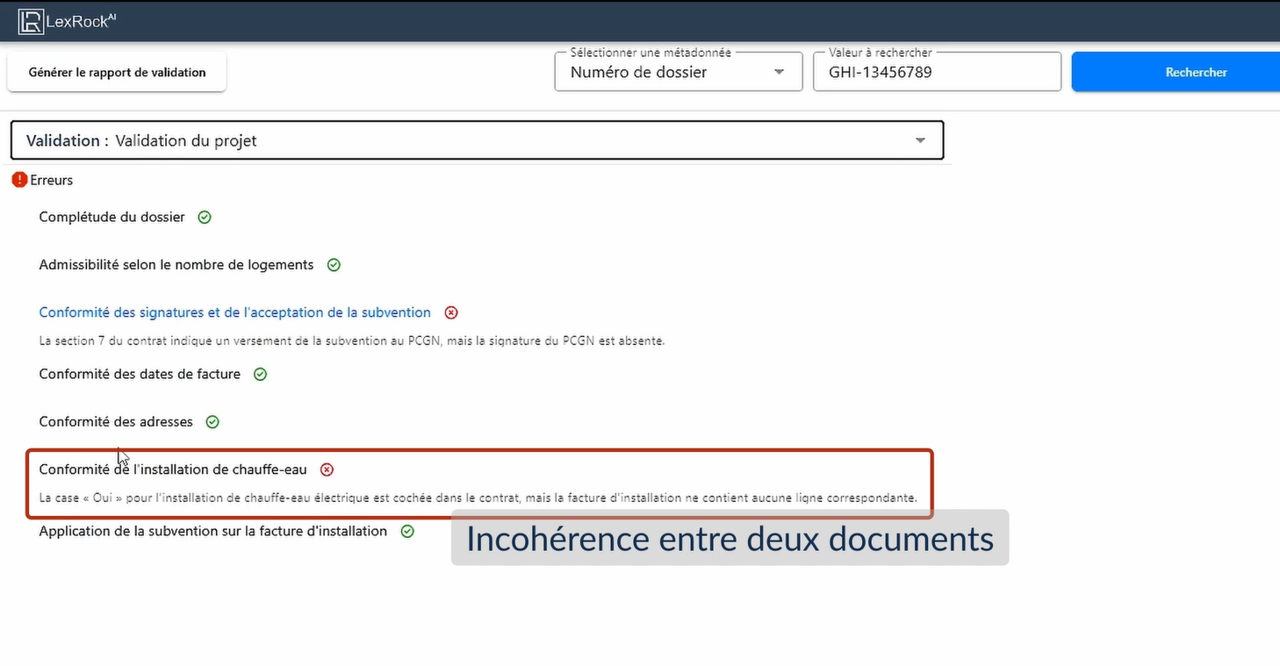
LR Studio automatically identifies required evidence missing from a file and quickly indicates whether the file can be considered complete.
The platform compares information across documents: dates, addresses, amounts, statuses, admissible equipment or other business decision rules.
Inconsistencies are automatically flagged and clearly explained so teams can intervene quickly.
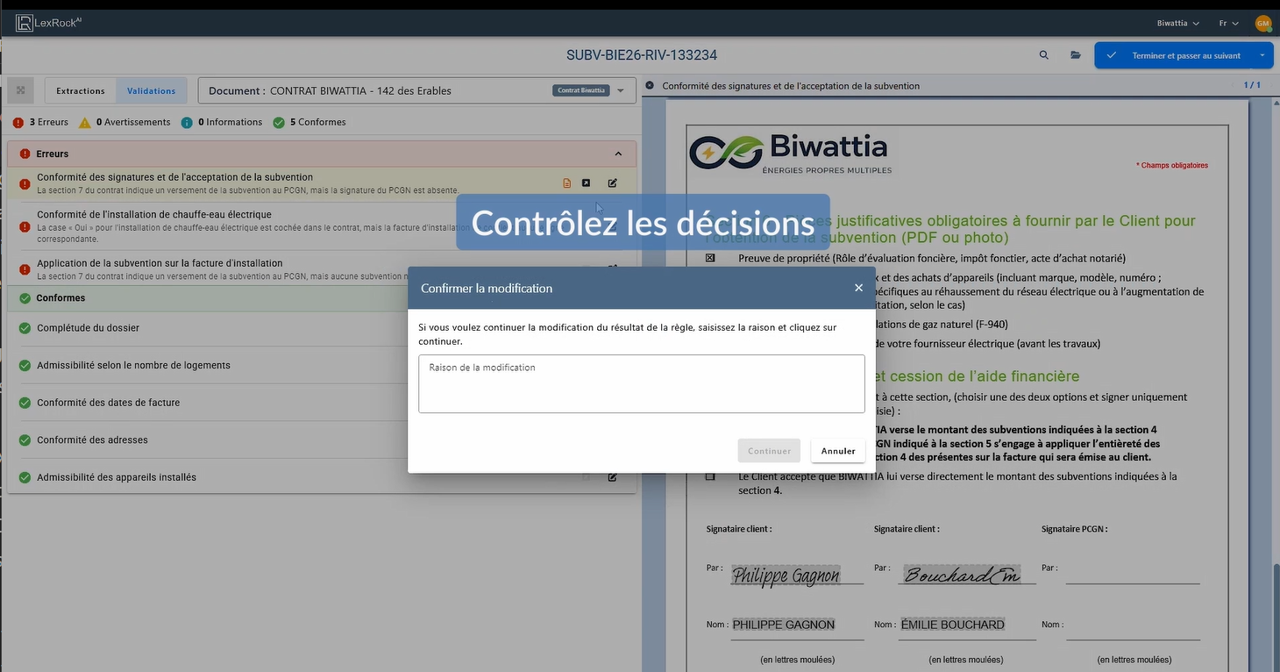
Each extracted piece of information can be linked back to its source document to support review, justification and accountability.
Teams can validate, comment, correct and document decisions when the context requires business judgment.
Structured data can support your systems, analytics and internal processes without losing the link to source documents.
Our goal is to simplify
LR Studio takes the essential steps of a document process and turns them into a structured workflow: upload, extraction, validation, decision and monitoring.
Operational flow
LR Studio acts as a document intelligence layer between received documents, AI-assisted processing, human validations and the systems that need to use the results.
 2 (EN).png)
LR Studio step by step
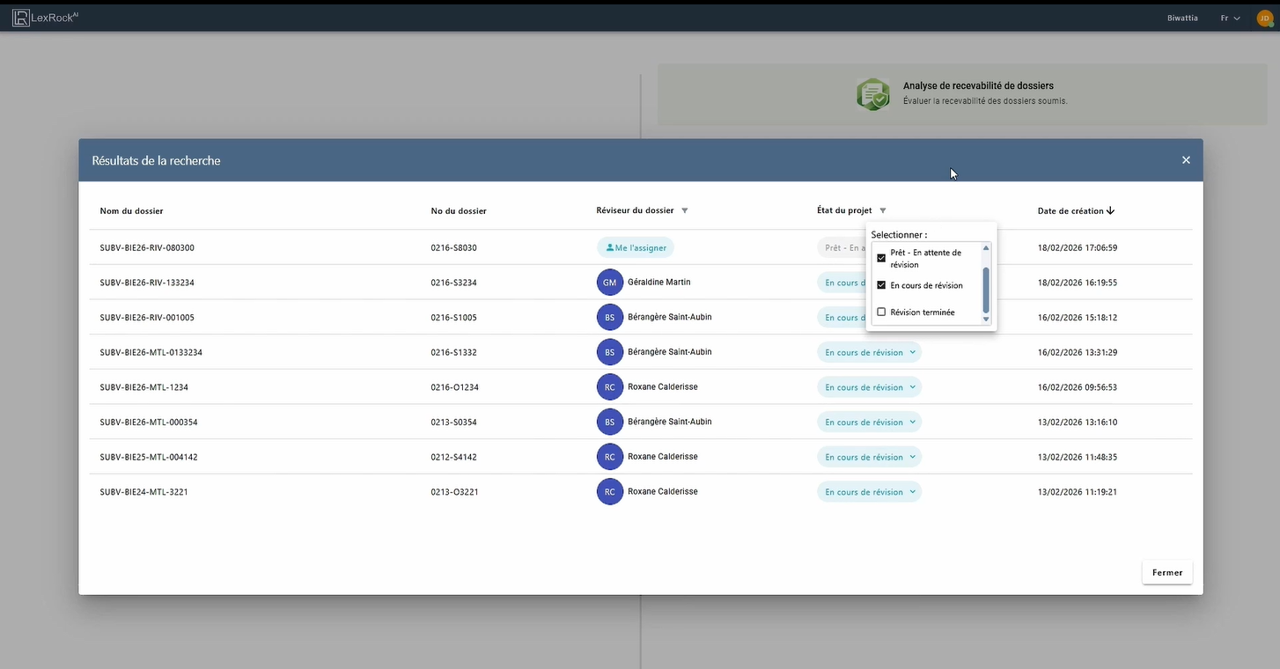
Real LR Studio screenshots show a platform that does more than extract text. It connects information, sources, rules, human validations and decisions.
LR Studio in action
The demonstration shows how LR Studio helps detect missing evidence, compare information, identify anomalies, access sources and support a documented decision.
Do you have a similar process?
If your organization compares documents, applies business rules and must justify decisions, a short discussion can be enough to identify the potential of a first use case.
Integration with existing systems
LR Studio becomes more valuable when it connects to the tools teams already use. The goal is not to replace your entire ecosystem, but to add a controlled, traceable and usable document intelligence layer.
What differentiates LR Studio
Information is extracted and linked back to source documents to support verification and trust.
The platform supports multilingual and heterogeneous document environments, a common reality in operational organizations.
The approach emphasizes governance, traceability, explainability and organizational control over data and decisions.
What LR Studio is not
LR Studio does not stop at reading text. It connects information to rules, sources, validations and decisions.
The platform supports structured processes, not just conversational answers from documents.
Results must be verifiable, correctable, explainable and linked back to source documents.
Human judgment remains in the loop when context, risk or the decision requires it.
Operational maturity
Expected outcomes
Evaluation deliverables
The goal is not to multiply meetings. It is to quickly determine whether a use case deserves to be operationalized with LR Studio.
Is your case a good candidate?
Some use cases are naturally strong candidates. Others must be scoped before automation. The goal of an initial discussion is to quickly determine where the real potential lies.
A file includes forms, evidence, invoices, statements, contracts or supporting documents that must be compared.
Teams already apply rules, but they are scattered, implicit or too manual.
A significant part of the work involves checking the same elements from one file to another.
Simple cases can be accelerated, while exceptions should be routed to the responsible teams.
Results must be explained, documented, reviewable and defensible after the fact.
Extracted data must be transferred to a CRM, ERP, portal, DMS or other internal system.
First meeting
We start by understanding the real process: documents, rules, exceptions, systems and risks. This step helps determine whether LR Studio can create measurable value, without forcing a solution where it would not be relevant.
Move to evaluation
We can analyze a specific use case, identify the documents, rules, validations and risks, then determine the best way to operationalize it.